🚨 **YOUR SQL QUERY IS SLOW?**
DON’T ADD AN INDEX YET.
First, open the Execution Plan. 👀
One of the biggest mistakes in SQL Server performance tuning is changing the query or adding indexes without understanding what SQL Server is actually doing.
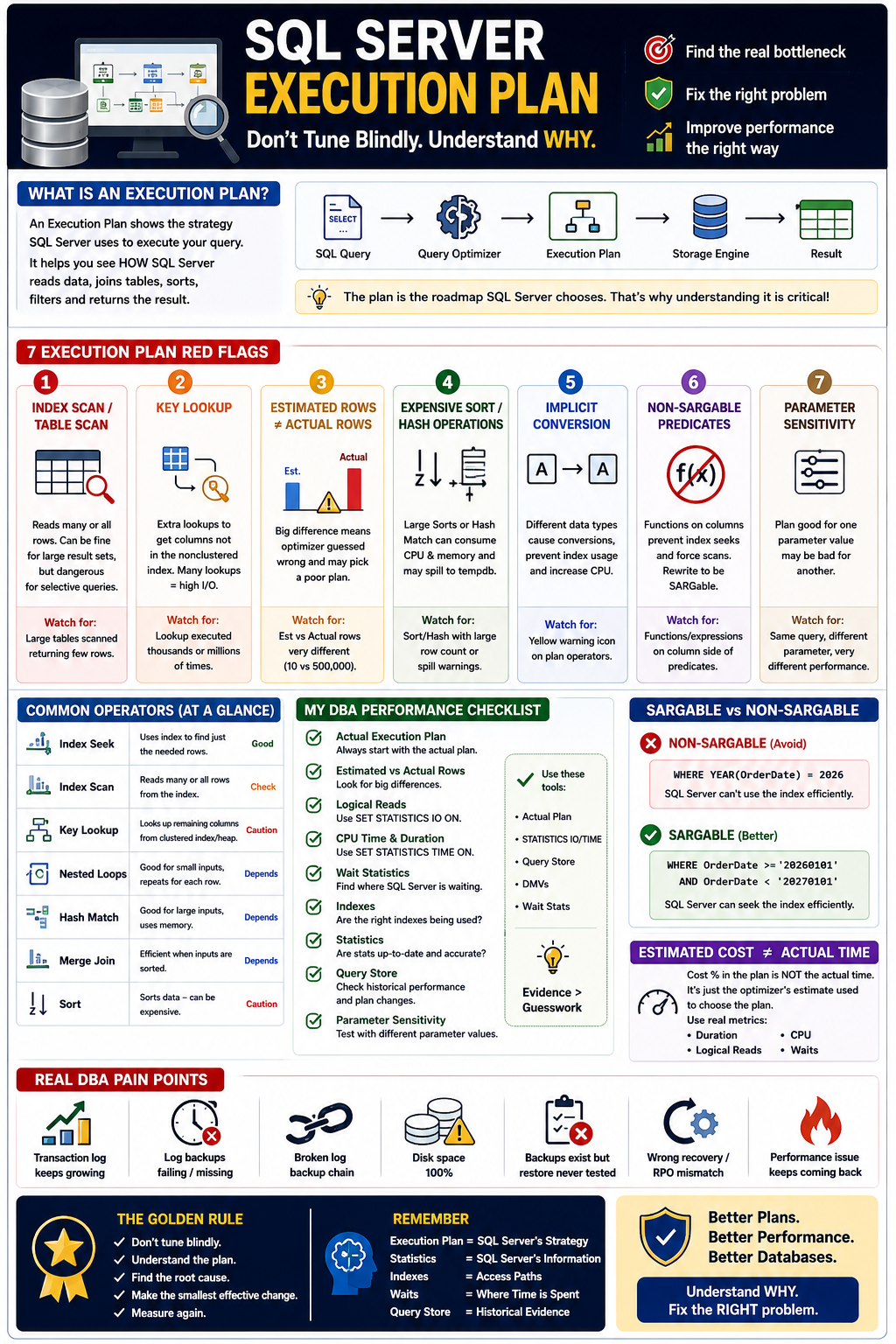
🔍 What is an Execution Plan?
An Execution Plan shows the strategy SQL Server chooses to execute your query:
Query → Query Optimizer → Execution Plan → Storage Engine → Result
It helps you answer:
👉 Where is SQL Server spending time? 👉 What data is it reading? 👉 Which operator is expensive? 👉 Are estimates different from reality? 👉 Is the index actually being used effectively?
🚨 7 EXECUTION PLAN RED FLAGS
1️⃣ Index Scan / Table Scan
Not every scan is bad.
But scanning millions of rows to return a few rows can be a serious performance problem.
2️⃣ Key Lookup
SQL Server finds rows through a nonclustered index and then performs additional lookups to retrieve required columns.
Thousands or millions of lookups can create significant I/O.
3️⃣ Estimated Rows ≠ Actual Rows
Example:
Estimated: 10 rows Actual: 500,000 rows
🚨 Huge estimation errors can lead the optimizer toward a poor plan.
4️⃣ Expensive Sort / Hash Operations
Large sorts or hash operations can consume significant CPU and memory—and may spill to tempdb.
5️⃣ Implicit Conversion
Different data types in joins or predicates can cause conversions and sometimes prevent efficient index usage.
6️⃣ Non-SARGable Predicates
Example:
WHERE YEAR(OrderDate) = 2026
A range predicate can often be more index-friendly:
WHERE OrderDate >= '20260101'
  AND OrderDate <  '20270101'
7️⃣ Parameter Sensitivity
A plan that works well for one parameter value may perform poorly for another when data distribution is uneven.
🧠 MY SQL SERVER PERFORMANCE CHECKLIST
Before changing anything, check:
✅ Actual Execution Plan ✅ Estimated vs Actual Rows ✅ Logical Reads ✅ CPU Time ✅ Query Duration ✅ Wait Statistics ✅ Indexes ✅ Statistics ✅ Query Store ✅ Parameter sensitivity
Use:
SET STATISTICS IO ON;
SET STATISTICS TIME ON;
These help you measure logical reads and CPU/time, rather than relying only on the visual plan.
⚠️ ONE IMPORTANT DBA LESSON
Don't look at an execution plan and immediately say:
❌ “This Index Scan is bad.”
❌ “This Hash Match is bad.”
❌ “This operator has 80% cost, so it must be the problem.”
Instead ask:
“WHY did SQL Server choose this plan?”
The answer may involve:
Statistics + Cardinality Estimates + Indexes + Query Design + Data Distribution + Parameters + Memory + Waits
⭐ REMEMBER
Execution Plan = SQL Server's Strategy
Statistics = SQL Server's Information
Indexes = Access Paths
Waits = Where Time Is Being Spent
Query Store = Historical Evidence
🚀 Don't tune blindly.
Understand the plan → Find the bottleneck → Validate the root cause → Make the smallest effective change → Measure again.
💬 SQL Server Developers & DBAs:
What's the execution-plan issue you encounter most often?
1️⃣ Key Lookup 2️⃣ Index Scan 3️⃣ Bad Cardinality Estimates 4️⃣ Implicit Conversion 5️⃣ Parameter Sensitivity 6️⃣ TempDB Spill 7️⃣ Missing/Incorrect Index
Comment your number 👇
📌 Save this post for your next SQL Server performance-tuning session.
#SQLServer #DBA #SQLDeveloper #MSSQL #ExecutionPlan #PerformanceTuning #QueryOptimization #SQLTips #QueryStore #Indexes #Statistics #Database #MicrosoftSQLServer #DataEngineering